Resource Assignments
All column headings are now visible when screen scrolling is activated.
New Assignment Columns
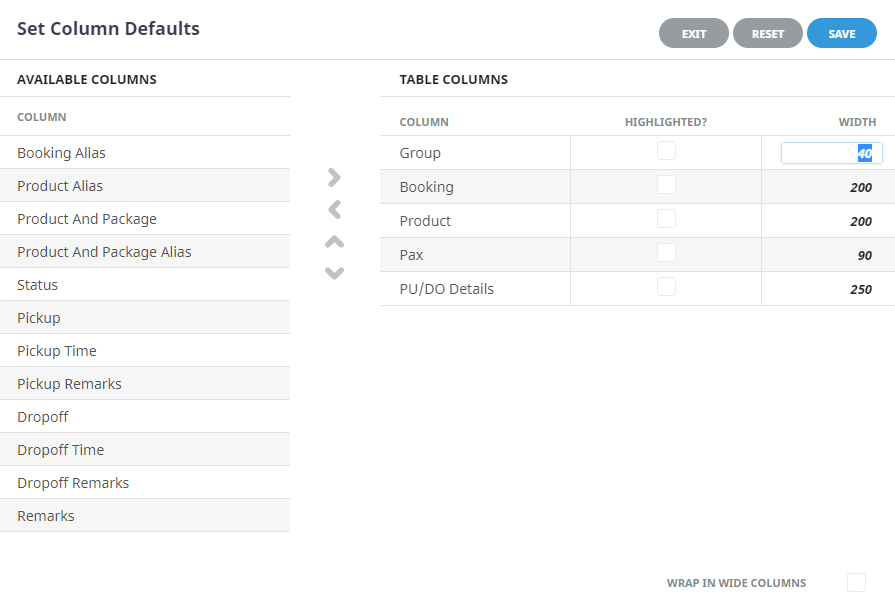
In the example below the default Group, Booking, Product, Pax and PU/DO Details headings are showing.

Users can click outside of the column headings within the header line to set column defaults. When the Set Column Defaults form appears, columns can be moved from the Available Columns list to the Table Columns list. Columns with the Highlighted checkbox selected will display the column information in bold, and column widths can be customised depending on user requirements.
Resource Assignment Columns
| Column Heading | Description |
|---|---|
| * Start Date | Service start date |
| * Name | Assignment name |
| * Assignment Type | Assignment type (Single, Independent, or Hop on Hop off) |
| * Status | Assignment status |
| * Pax | Number of pax |
| * Bookings | Booking number for assignment |
| * Driver | Driver initials |
| * Vehicle | Vehicle code |
| * Guide | Guide initials |
| End Date | Service end date |
| Driver Description | Driver description (often the full Name of driver) |
| Vehicle Description | Vehicle description (often the name, make model or registration of vehicle) |
| Guide Description | Guide description (often the full Name of guide) |